MODULE 2 : MESHED
MESHED
What is Meshed?
Meshed is our Student Management System, providing you with easy access to your online enrolments, timetable, grades, and attendance— all in one place.
How can i login to the Meshed?
- Go to MYCIHE
- Find the link to Meshed
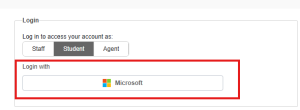
- Click on the Microsoft Button

How do I enroll classes online?
Students will have access to the online enrollment option in Meshed only during the enrollment period, and it will be disabled at other times. Make sure to select 4 units for each semester. Please be aware that you can only delete your enrollment once; after that, changes to your timetable will not be allowed. Once you’ve completed your enrollment, verify your units by checking the “Timetable” tab.
Note: If 4 units are unavailable, please contact via the ticketing system, and the CIHE team will assist you with the remaining unit.
How do I reset my meshed password?
How to Reset Your Password for Meshed
Go to the Meshed Portal:
- Open the following link: https://cihe.meshedhe.com.au
Click on “Forgot Password”:
- On the login page, click the “Forgot Password” link.
Enter Your Details:
- Username: Enter your username.(CIHE250000)
- Email: Enter the email address
- Security Question: Answer- Username (CIHE250000)
Receive Temporary Password:
- You will receive an email containing a temporary password.
Log in Using Temporary Password:
- Go to https://cihe.meshedhe.com.au/ and log in using the temporary password provided in your email.
Change Your Password:
- After logging in, click on “Profile”, then go to “Account & Security”.
- Under the Change Password section, enter your current temporary password.
- Below, you’ll find the option to set a new password of your choice. Enter your new password and save the changes.
Note: Meshed has separate credentials from Microsoft. Please use these credentials exclusively for logging into Meshed, and not for logging into your computer, Microsoft services, Teams, or other applications.